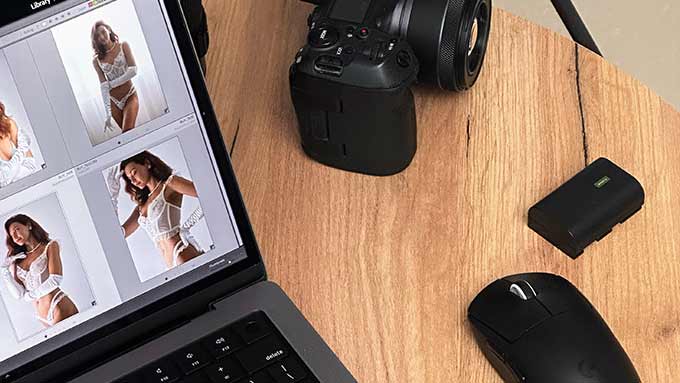
Everything comes off the Canon EOS R5 looking flat, slightly green, and uninspiring. That's deliberate. A RAW file is raw material, and I want maximum room to shape it without fighting the camera's own interpretation of the scene.
The software is Lightroom Classic for RAW processing and colour grading, Photoshop for targeted retouching, and the Reblum plugin for skin work when needed. Lightroom Classic is home base. My entire workflow is built around its HSL panel and targeted adjustment brushes, which give me precise control over skin tone without affecting the background.
RAW Processing
First pass is always global adjustments. Highlights come down. Shadows open up. White balance gets set by eye because I don't trust auto white balance on any camera. It shifts between frames depending on how much skin fills the composition, and consistency across a series matters more than any individual frame being technically "correct."
Nude photography lives in the midtones. That subtle gradient from light to shadow as it rolls across a curve, the zone where warm tones meet cool ones. That's where the image works or doesn't. I protect that range carefully. Contrast goes in through the tone curve rather than the contrast slider, because the curve lets me control exactly which tones get pushed apart and which stay together.
I set base exposure so the brightest skin highlight lands around 85-90% on the histogram. Blown skin looks harsh. Underexposed skin goes muddy. That 85-90% zone gives room to push warmer in grading without clipping anything.
Colour Grading
This is where each series gets its personality. I'm not chasing accuracy. I'm chasing a feeling.
The Goddess in Sunset series got pushed hard into warm golds and deep oranges in the highlights, with shadows drifting toward teal. That isn't what the scene looked like to the naked eye. It's what the scene felt like. Colour accuracy matters in product photography. Here, it's beside the point.
In Lightroom Classic, I build a look for each series using the HSL panel and colour grading wheels. Targeted adjustment brushes let me isolate the skin tone range and shift it warmer or cooler without touching the surroundings. A jungle shoot might get saturated greens in the foliage while skin stays warm and natural. A studio shoot might get desaturated everywhere except the skin tones themselves.
Once I lock a look for a series, I save it as a preset and apply it across every image in the set. This matters. The viewer should feel like all the images inhabit the same world, even if they were shot over multiple days or in slightly different light.
Skin Retouching
I retouch for distraction, not perfection. Mosquito bites come out. They're not part of who the model is. Temporary marks, a scratch, a bruise, a swimsuit tan line, those go away. They're noise.
Freckles stay. Stretch marks stay. Moles, scars, the texture of actual skin. All of it stays. I work with clone stamp and healing brush in Photoshop on a separate layer, and I try to spend no more than ten to fifteen minutes on skin per image. If I'm retouching longer than that, I'm probably fixing something that shouldn't be fixed.
I never use the Liquify tool on a body. No slimming waists. No reshaping hips. No smoothing curves to match some imagined ideal. The body in the final image is the body that was in the room. I've turned down paid work from people who specifically wanted body reshaping. It isn't part of what I do, and I'd rather lose the fee.
For skin smoothing, the Reblum plugin handles texture and tone separation inside Lightroom Classic without the Photoshop gymnastics of manual frequency separation. I use it sparingly, mostly on tight face crops where pore texture competes with the composition. On full-body or three-quarter shots, I rarely touch it. At that distance, skin texture is what makes the photograph feel real. Over-smoothed skin reads as plastic, and nothing makes nude photography look cheaper faster.
The Retouching Philosophy, Expanded
There's a broader point here that goes beyond technique. Every retouching decision is an editorial statement about what the body should look like. When a photographer smooths skin to porcelain, removes every visible pore, shrinks a waist by twenty pixels, they're saying something about which bodies deserve to be in photographs. I disagree with that statement, so I don't make those edits.
That doesn't mean I'm a purist who leaves everything untouched. The camera sensor captures things the eye doesn't notice, pores at a magnification we never see in person, skin textures exaggerated by hard light. Some processing just brings the image closer to how we actually perceive a person standing in front of us. The line between "returning to perception" and "idealizsing" is blurry, and I walk it carefully with every image.
Output
I export at full resolution for portfolio and print work, then create web-optimised versions for the site. Sharpening is the last step and I keep it conservative. If I can see the sharpening, there's too much. For web output, Lightroom Classic's export dialog handles screen-targeted sharpening. For print, I sharpen differently depending on paper: matte stock needs more aggressive treatment than glossy because ink spread softens the image.
The full editing pipeline for a series of thirty to forty final images takes two to three days. I don't rush it. I don't edit the same series on consecutive days, either. Fresh eyes catch things tired eyes normalise. I learned this the hard way after approving a colour cast at 2am that looked obviously wrong the next morning. Ten hours of screen time makes you unreliable, and the images deserve better than that.